This week we released a new feature that allows you to add and remove your own administrators to your dashboard! To find this brand new feature, click on settings at the very top of your dashboard. This is the same place where you currently manage your schedules. When you open settings, you will see a new tab in the dark blue bar across the top called Admin.
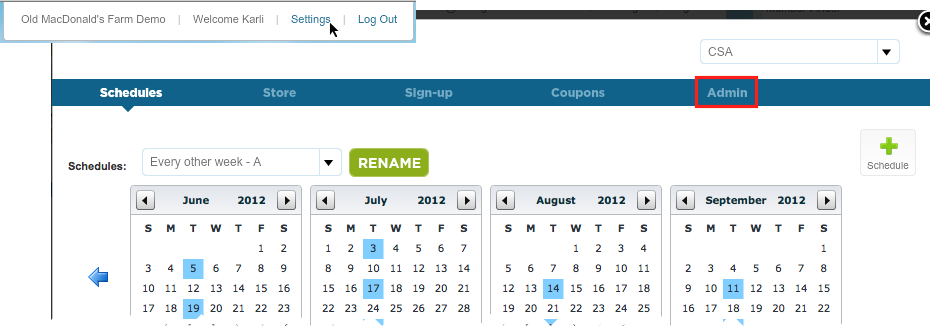
The New Admin Interface
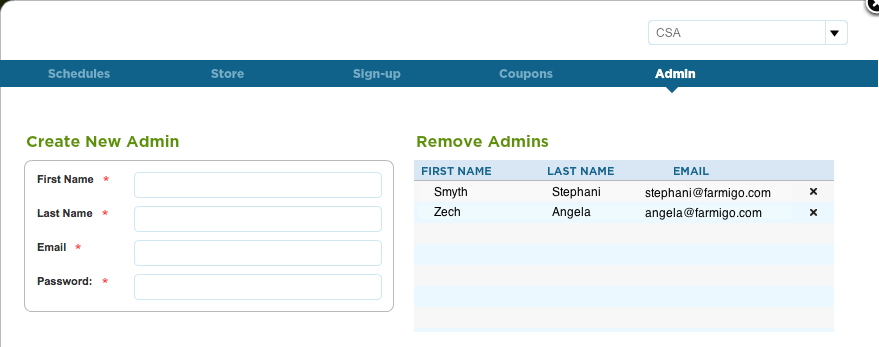
How to add and remove admins:
To add a new admin, fill in their First Name, Last Name, Email, and Password. ***The password must be more than 6 characters. Press save. Once you add a new admin they will show up on the right side. Now, these people will have access to the dashboard. If you would like these people to be added to the TOW mailing list, please let us know by emailing [email protected].
To remove an admin, click on the x to the right of their information and press save. We hope this improvement adds a bit of simplicity to your life as many of you begin making deliveries for your CSA.
To add a new admin, fill in their First Name, Last Name, Email, and Password. ***The password must be more than 6 characters. Press save. Once you add a new admin they will show up on the right side. Now, these people will have access to the dashboard. If you would like these people to be added to the TOW mailing list, please let us know by emailing [email protected].
To remove an admin, click on the x to the right of their information and press save. We hope this improvement adds a bit of simplicity to your life as many of you begin making deliveries for your CSA.